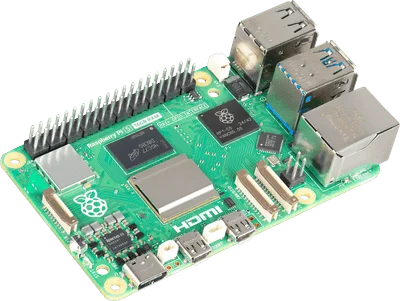
Choose a Raspberry Pi 5 when exposed GPIO, electronics projects, or Raspberry Pi-specific software are part of the job. Choose an Intel N100 or N150 mini PC when you primarily want a small server with x86 software and integrated storage. The fairest comparison is a complete working Pi against a clearly specified mini PC, not a bare board against an assembled computer.
The Pi 5 in our collection can do either computing or electronics work. This guide concentrates on a home server; Pi vs Arduino covers physical projects.
Compare the systems you would actually buy
| Decision | Raspberry Pi 5 | Intel N100/N150 mini PC |
|---|---|---|
| Software architecture | Arm | x86-64 |
| Physical projects | Exposed GPIO header | Usually requires external interfaces |
| Storage plan | microSD, USB, or supported PCIe storage setup | Model-specific SSD and expansion options |
| What is included | Depends on board or kit listing | RAM, SSD, and power supply vary by listing |
| Video acceleration | Pi-specific hardware and software support | Intel Quick Sync on supported processors |
Use Raspberry Pi’s specifications and Intel’s N-series comparison to identify the hardware. N100 and N150 are processor names, not complete computers with identical cooling, ports, or upgrade options.
Add up the Pi accessories first
Build a shopping list containing the board, suitable power supply, enclosure, cooling, storage, and any storage adapter. Then add the cables or radios required by the service. Compare that sum with the same functional mini-PC configuration.
There is no fixed winner on price. RAM variants, promotions, storage choices, and regional availability can reverse the result. Use current seller prices for matching complete configurations, including any missing parts.
For a fair baseline, compare an 8 GB Pi configuration with an 8 GB mini PC and account for the actual SSD capacity in each. This is a planning example, not a benchmark or a claim that every service needs 8 GB.
Software compatibility matters before CPU speed
List the services you want to run and check their supported architectures. For containers, look for the required Arm64 or amd64 image. For virtualization, verify both the intended guest operating system and the host software. A familiar application name does not guarantee an image exists for every architecture.
An x86 mini PC is worth considering when a particular application or virtual machine is your main requirement. A Pi is worth considering when the project relies on its GPIO, accessories, or a documented Pi installation path. Choose the supported route rather than assuming any Linux computer will be interchangeable.
If the only service is Home Assistant, read Pi 5 vs Home Assistant Green before adding a general-purpose host to the shortlist.
Media servers, power, and storage
Intel documents Quick Sync support for N150. That is a reason to investigate an Intel system for hardware-assisted transcoding, not a promise that every codec or media-server configuration will work automatically. Check the software’s acceleration support and any licensing requirements.
Do not compare a processor’s published power figure with another system’s wall consumption. The enclosure, SSD, RAM, peripherals, and idle behavior all contribute. Likewise, network and storage bottlenecks can matter more than CPU speed for a small file server. Define the workload before deciding what a useful benchmark would measure.
Frequently asked questions
Is an N150 always better than an N100?
Not as a complete purchase. The particular machine’s cooling, RAM, storage, network ports, warranty, and current price still matter.
Can Raspberry Pi 5 run Docker?
Yes, but each intended image must support the chosen operating system and architecture. Check the actual applications rather than stopping at Docker compatibility.
Which is better for Pi-hole?
Both can be appropriate supported hosts. For one small service, existing hardware and maintenance convenience may matter more than buying a faster new machine.