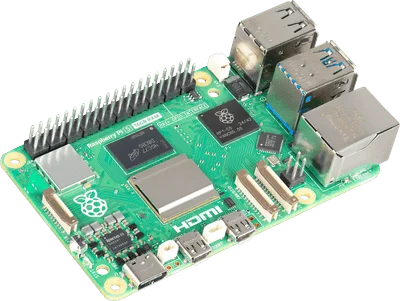
Choose a Raspberry Pi when the project needs a general-purpose operating system, a web service, or computer-style applications. Choose an Arduino Uno-class microcontroller board when the main job is reading inputs and controlling outputs through a focused program. Neither is the universally better beginner board: start with the task.
Here, Raspberry Pi means a computer such as the Pi 5 in our collection, and Arduino means an Uno-class board, using UNO R4 WiFi as a concrete example. Both brands sell multiple kinds of hardware, so the brand name alone is not a specification.
Computer versus microcontroller
| Project question | Raspberry Pi computer | Arduino UNO R4 WiFi |
|---|---|---|
| Software model | Operating system and applications | A program running on a microcontroller |
| Typical starting task | Server, desktop, or camera application | Read a sensor and control an output |
| Development routine | Configure the OS and application | Write and upload a sketch |
| Networking | Built into Pi 5 | Networking hardware also present on R4 WiFi |
| Main learning emphasis | Linux, software, and system setup | Inputs, outputs, and program behavior |
Raspberry Pi’s explanation distinguishes these roles and describes using the boards together. The UNO R4 WiFi documentation identifies its microcontroller and networking hardware. Internet access is not exclusive to Raspberry Pi.
Start with one sentence about the project
Write what the device must do without naming a board. For example: “Show a small web page with the room’s latest sensor reading,” or “Turn on an LED when a button is pressed.” Then identify what software and hardware that sentence requires.
If the interesting work is serving pages, managing files, or running an existing Linux program, a Pi is a natural starting point. If it is understanding a sensor, a button, and an output, an Uno-class board provides a focused environment without first managing a general-purpose OS.
The same project can sometimes be implemented on either. That is a reason to choose the learning experience you want, not to buy both immediately.
Timing and complexity change the decision
An ordinary Linux application shares resources with other processes. A dedicated microcontroller program offers a different way to organize recurring input and output tasks. That distinction matters when precise timing is central, but it does not automatically make every microcontroller program real-time or every Pi project unsuitable for physical control.
For a robot, you might separate responsibilities: a computer handles a camera or higher-level interface, while a microcontroller handles a focused control task. For a first project, keep that architecture small. A blinking LED does not need two boards and a network protocol.
Budget for the complete experiment
A Pi computer needs suitable power and storage, and the enclosure or cooling appropriate to its use. A microcontroller project needs its own cable, power plan, and components. Compare the complete experiment rather than using board price as the whole budget.
Check pin voltage, current limits, and wiring for the exact hardware before connecting it. Pi GPIO and Uno-class connections must not be assumed electrically interchangeable. Follow the relevant board and component documentation; a physical connector fitting is not a compatibility check.
For a server rather than an electronics experiment, Pi 5 vs mini PC is the more relevant comparison.
Frequently asked questions
Can Arduino connect to Wi-Fi?
Some models can. UNO R4 WiFi includes networking hardware, so compare exact boards rather than assuming all Arduino products lack it.
Can Raspberry Pi read sensors?
Yes, with compatible hardware and software. Its computer role does not prevent electronics projects; it changes the setup and development choices.
Which is easier for a complete beginner?
The one with clear instructions for the project you want to complete. Choose a small documented task, obtain the matching parts, and expand after it works.